# Diagram Editor - Controls

### Basic Diagram Editor controls

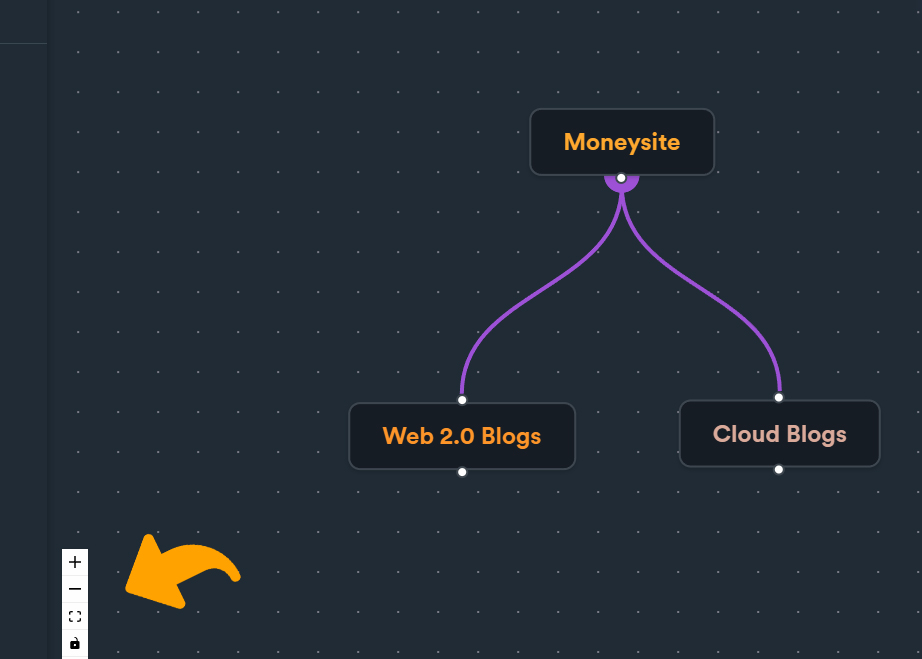
On the lower right corner of diagram editor you can find a toolbar with some basic tools to help you when you are creating/editing your diagram.

<figure><img src="https://2718133043-files.gitbook.io/~/files/v0/b/gitbook-x-prod.appspot.com/o/spaces%2F2UzeMjUGHvOZRX1jMiVc%2Fuploads%2Fwb3u9PYWee4ZrshCI58n%2Fdiagram%20controls.jpg?alt=media&#x26;token=af957439-cdc5-470a-a937-1b18020a8dfe" alt=""><figcaption></figcaption></figure>

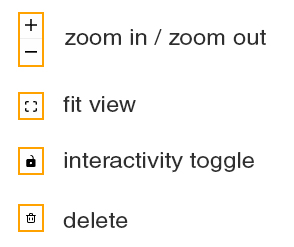
Here is a small description of each tool functionality:

<div align="left"><figure><img src="https://2718133043-files.gitbook.io/~/files/v0/b/gitbook-x-prod.appspot.com/o/spaces%2F2UzeMjUGHvOZRX1jMiVc%2Fuploads%2FFCQ42E6UMV4bDeSHGaAA%2Fdiagram%20editor%20toolbar.jpg?alt=media&#x26;token=8083d41a-2566-4e33-a206-fbeb48558c69" alt=""><figcaption></figcaption></figure></div>

**Zoom in / zoom out**: diagram zoom

**Fit view**: automatically fits whole diagram on screen to fit whole view.

**Interactivity toggle**: you can toggle interactivity on/off. When you turn off interactivity, you cannot move any nodes or connection on diagram.

**Delete**: deletes selected group nodes or selected connections (same as "**delete**" / "**backspace**" keys)

### Selections

You can select select a **group** or a **connection** by clicking on them.

When you select a group, it will get highlighted as shown below.

<figure><img src="https://2718133043-files.gitbook.io/~/files/v0/b/gitbook-x-prod.appspot.com/o/spaces%2F2UzeMjUGHvOZRX1jMiVc%2Fuploads%2FZxYtQxI30aBP4FfxbW8s%2Fdiagram%20editor%20-%20selected.jpg?alt=media&#x26;token=b31d5742-2b65-483c-9816-62876d0ff0ed" alt=""><figcaption><p>Group node selection</p></figcaption></figure>

When you select a connection it will get a dash-line highlight effect.

<figure><img src="https://2718133043-files.gitbook.io/~/files/v0/b/gitbook-x-prod.appspot.com/o/spaces%2F2UzeMjUGHvOZRX1jMiVc%2Fuploads%2FENURVcwOPgD7MRbdQ2Ft%2Fdiagram%20editor%20-%20selected%20connection.jpg?alt=media&#x26;token=cd565f0f-337e-4aba-af36-b476b754f26a" alt=""><figcaption><p>Selecting a connection</p></figcaption></figure>

You can also select multiple groups using **Ctrl** (Windows) / **Command** (Mac) to move or delete them.

<figure><img src="https://2718133043-files.gitbook.io/~/files/v0/b/gitbook-x-prod.appspot.com/o/spaces%2F2UzeMjUGHvOZRX1jMiVc%2Fuploads%2FiMRcJzByzFbzQx0Wt2Sf%2Fdiagram%20editor%20multiple%20select.JPG?alt=media&#x26;token=35f62c86-622c-4cde-a6e6-f3bc03ea2892" alt=""><figcaption><p>Multiple selection of groups</p></figcaption></figure>

### Deleting groups & connections

To delete a group or a connection, select either a group or a connection and press "**delete**" or "**backspace**" on keyboard or use "**delete**" tool from toolbar.