# 2 - Common

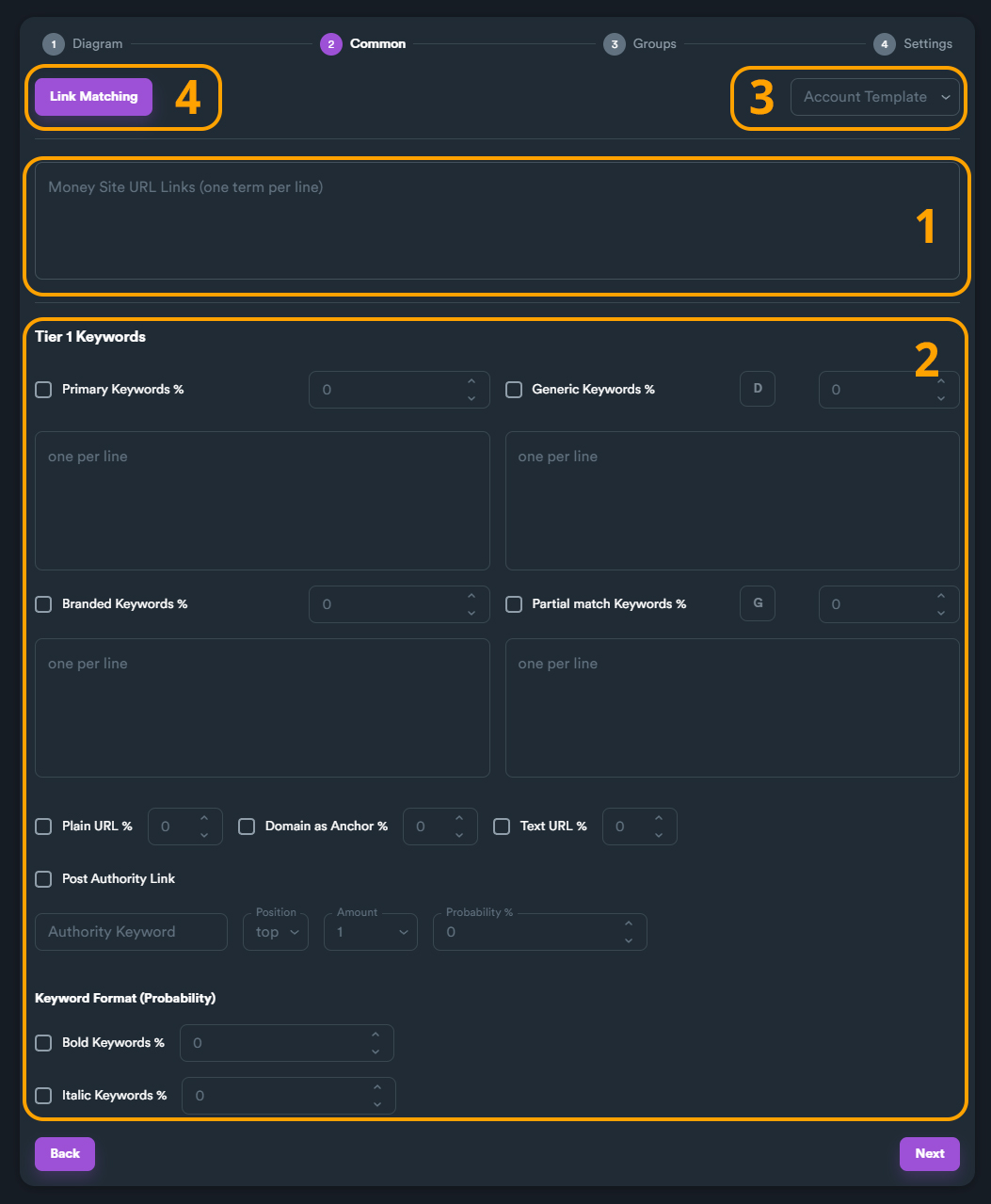
On this section you can enter your target urls (money site URLs), set all keywords, select your account template and match your keywords with URLs.

In general, in this section you enter all campaign data that is common for the whole campaign.

<figure><img src="https://2718133043-files.gitbook.io/~/files/v0/b/gitbook-x-prod.appspot.com/o/spaces%2F2UzeMjUGHvOZRX1jMiVc%2Fuploads%2FfRj6Jq4OHTMYqZ4pEjJH%2Fcampaign%20-%20common%201.jpg?alt=media&#x26;token=6cc3990f-df33-4468-a43b-6f490145385b" alt=""><figcaption></figcaption></figure>

#### **(1)** **Money Site URL Links**

Here you enter all URLs that you want your campaign to target. You can enter multiple URLs (one per line).

<figure><img src="https://2718133043-files.gitbook.io/~/files/v0/b/gitbook-x-prod.appspot.com/o/spaces%2F2UzeMjUGHvOZRX1jMiVc%2Fuploads%2FJ4uWq9qAsXE7O6e1Rskk%2Fcampaign%20-%20common%20-%20moneysite.jpg?alt=media&#x26;token=a6e02203-2ea7-4644-83af-9c080e21a1ad" alt=""><figcaption></figcaption></figure>

**(2)** **Keywords**

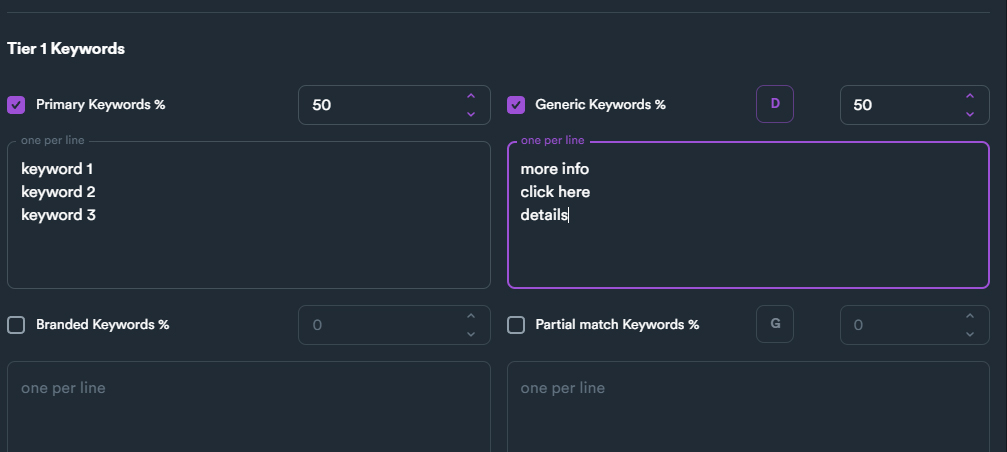
Here you set all keyword settings for your campaign. You can enable which keyword types you want to enable.

<figure><img src="https://2718133043-files.gitbook.io/~/files/v0/b/gitbook-x-prod.appspot.com/o/spaces%2F2UzeMjUGHvOZRX1jMiVc%2Fuploads%2F2mabH2z5o3Bn0Y72M9MQ%2Fcampaign%20-%20common%20-%20keywords.jpg?alt=media&#x26;token=e5b0756e-91d3-4948-bcd2-3295a919f789" alt=""><figcaption></figcaption></figure>

In the example above we have enabled two keyword types (Primary keywords and Generic keywords).

We have set 50% for **Primary keywords** and 50% for **Generic keywords**.

We have also entered 3 Primary keywords and 3 Generic keywords.

#### **(3)** **Account Template**

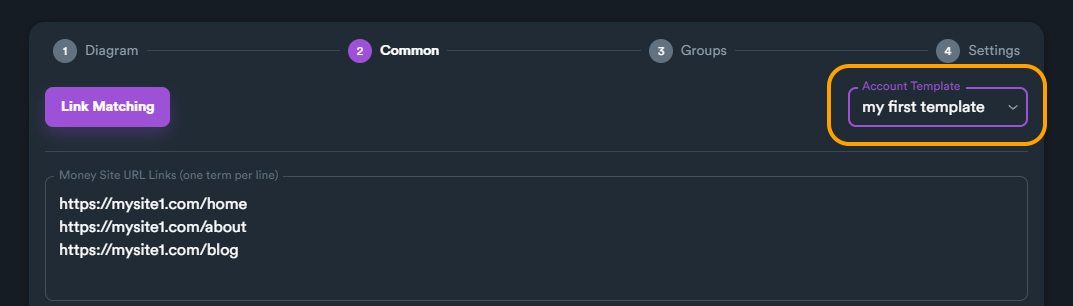
An account template is a requirement for a campaign. To select an account template click on drop-down menu (located on top-right) and select an account template.

<figure><img src="https://2718133043-files.gitbook.io/~/files/v0/b/gitbook-x-prod.appspot.com/o/spaces%2F2UzeMjUGHvOZRX1jMiVc%2Fuploads%2Faik9bLrE123GimnZDtui%2Fcampaign%20-%20account%20template.jpg?alt=media&#x26;token=b4fb9612-3390-4092-9841-8fbd66e6e9b2" alt=""><figcaption></figcaption></figure>

{% hint style="info" %}
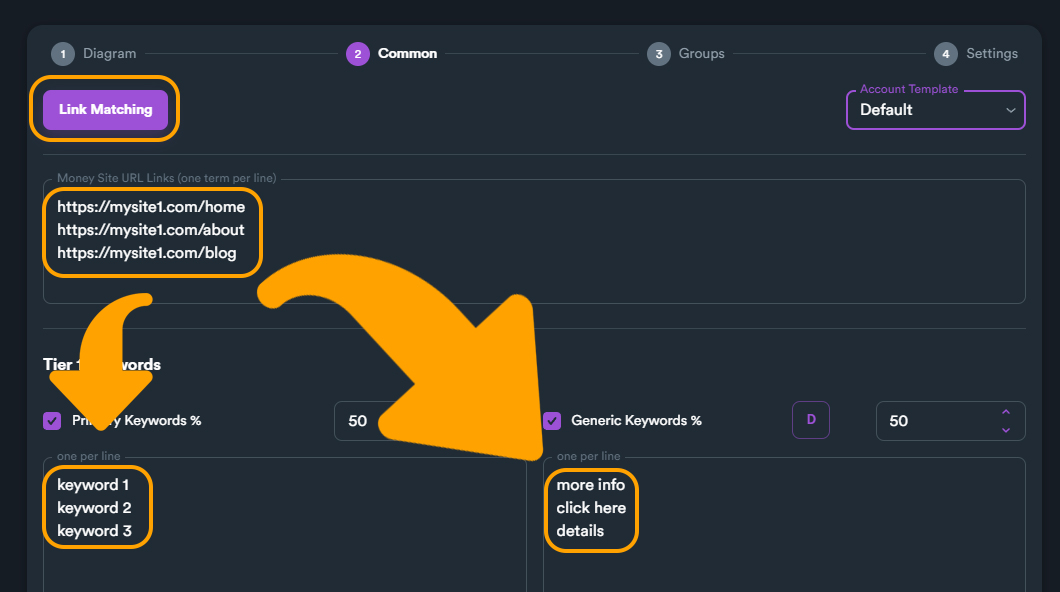
If you haven't created any account template you can always select SEO Neo's default template. Keep in mind that a custom account template with own Gmails provides higher success rate than Default account template.
{% endhint %}

<figure><img src="https://2718133043-files.gitbook.io/~/files/v0/b/gitbook-x-prod.appspot.com/o/spaces%2F2UzeMjUGHvOZRX1jMiVc%2Fuploads%2Fdys7TkKgIWvKP2HJoaHz%2Fcampaign%20-%20account%20template%20-%20default.jpg?alt=media&#x26;token=0457b2cf-64f1-45be-8a0a-43da919fa654" alt=""><figcaption></figcaption></figure>

#### **(4)** **Link Matching**

With Link Matching, you can match (link) selected URLs with specific keywords.

<figure><img src="https://2718133043-files.gitbook.io/~/files/v0/b/gitbook-x-prod.appspot.com/o/spaces%2F2UzeMjUGHvOZRX1jMiVc%2Fuploads%2FXlIrcXFAErVnPfnaH4fQ%2Fcampaign%20-%20link%20matching.jpg?alt=media&#x26;token=eb4f780f-6bc4-44ad-bf47-e70d057ebb41" alt=""><figcaption></figcaption></figure>

Please **read more information** about Link Matching feature.