# Account Templates
### Introduction
An account template is a template that is used as a guideline on how SEO NEO creates new accounts.
When a new account is created (registration), SEO NEO will need information on how to register this account. This information includes:
**Email details**: (username, password, mail server, SSL etc.)
**Account creation details**: the username and password format that will be used to register the new account. This information uses [spintax format](https://docs.seoneo.io/~/changes/c3esrpjGy8mxnwIOXO75/additional-information/glossary/spintax-format) to create different variations.
Account template is a templates on how accounts are created.
### Account Templates Window Overview
Main sections overview to manage your Account Templates
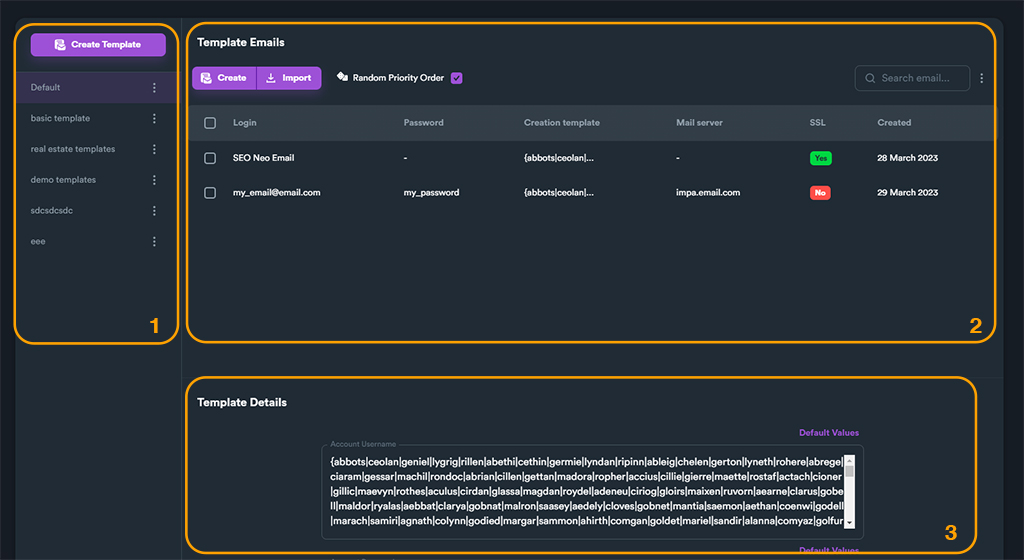
Account Templates main screen is divided into three sections.
1\) **Account templates list** : where all your account templates files are listed and stored. You can create, delete and rename your account templates from here.
2\) **Template Emails**: you can manage all emails for selected account template from here.
3\) **Template Details**: here you enter username and password for selected account template.