# Creating Account Buckets

Creating an account bucket is very simple:

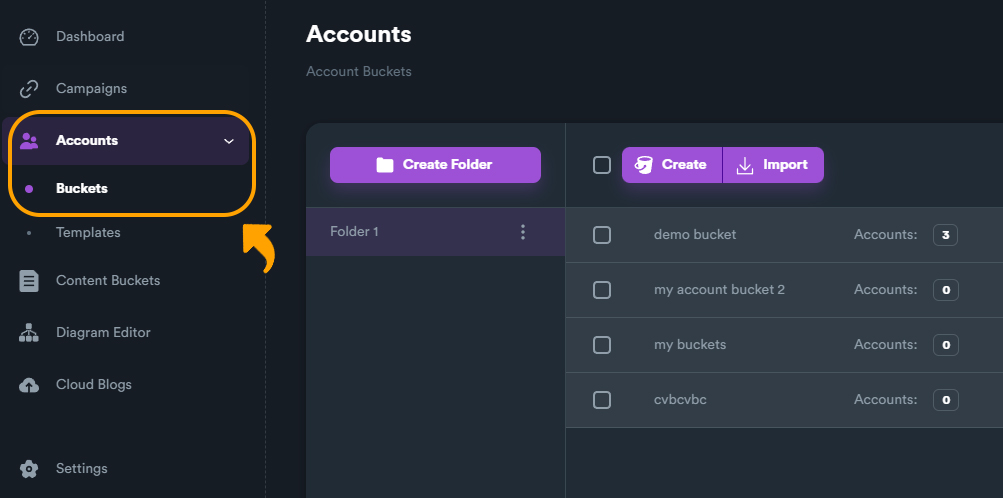
1\) Navigate on "**Accounts**" > "**Account Buckets**"

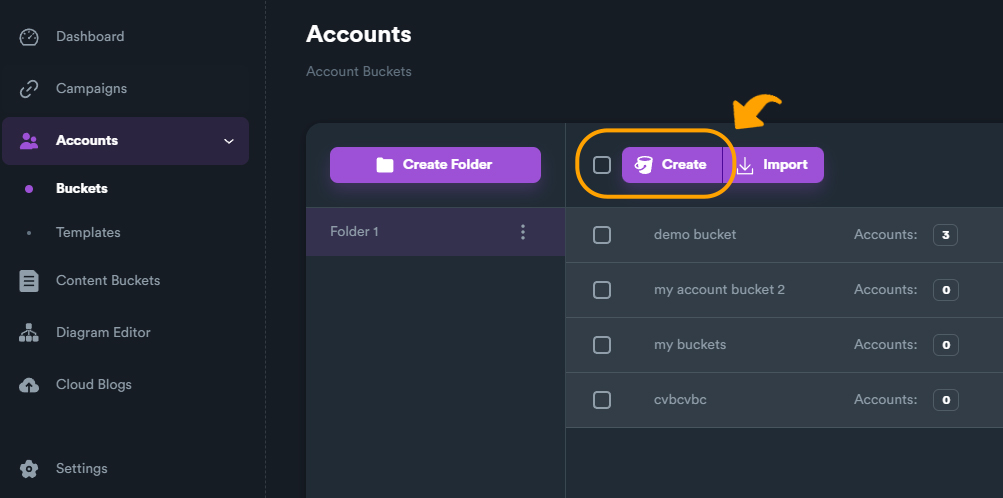
2\) Click on "**Create**", type a name for your bucket, and you are ready to go.

<figure><img src="https://2718133043-files.gitbook.io/~/files/v0/b/gitbook-x-prod.appspot.com/o/spaces%2F2UzeMjUGHvOZRX1jMiVc%2Fuploads%2FDHaY146kMK59PVe3tKC4%2Faccount_buckets%20menu.JPG?alt=media&#x26;token=02de0bf7-7896-49e4-a5ac-05b75964267b" alt=""><figcaption></figcaption></figure>

<figure><img src="https://2718133043-files.gitbook.io/~/files/v0/b/gitbook-x-prod.appspot.com/o/spaces%2F2UzeMjUGHvOZRX1jMiVc%2Fuploads%2FQX9q36sWv1Pb8OH8OoTL%2Faccount_bucket%20create.jpg?alt=media&#x26;token=37e085d9-d65c-4bbe-86eb-f0fd7588515f" alt=""><figcaption></figcaption></figure>

{% hint style="info" %}
When you first create an account bucket, the bucket is empty of accounts. If you use this empty bucket on a campaign, SEO NEO will add registered accounts into this account bucket.
{% endhint %}